A barber script is judged on one thing: what the player sees before paying, and what is left of their character after a reconnect.
Avenida Team, 24 August 2026
There is no shortage of barber scripts for FiveM, and most of them sell the same thing: shop management, barbers owned by players or run by NPCs, a price per category, and the 0.00 ms idle figure everyone advertises. On that front they all look the same, so the choice comes down to price.
This article is about something else. We wrote avenida_barber because none of the ones we had tried answered two questions we kept asking, and those two questions became the criteria for this article. Further down we also publish exactly what you gain depending on the appearance system you already run, target by target. That is where a purchase is won or lost, and nobody spells it out.
What does this barber script actually add to your server?
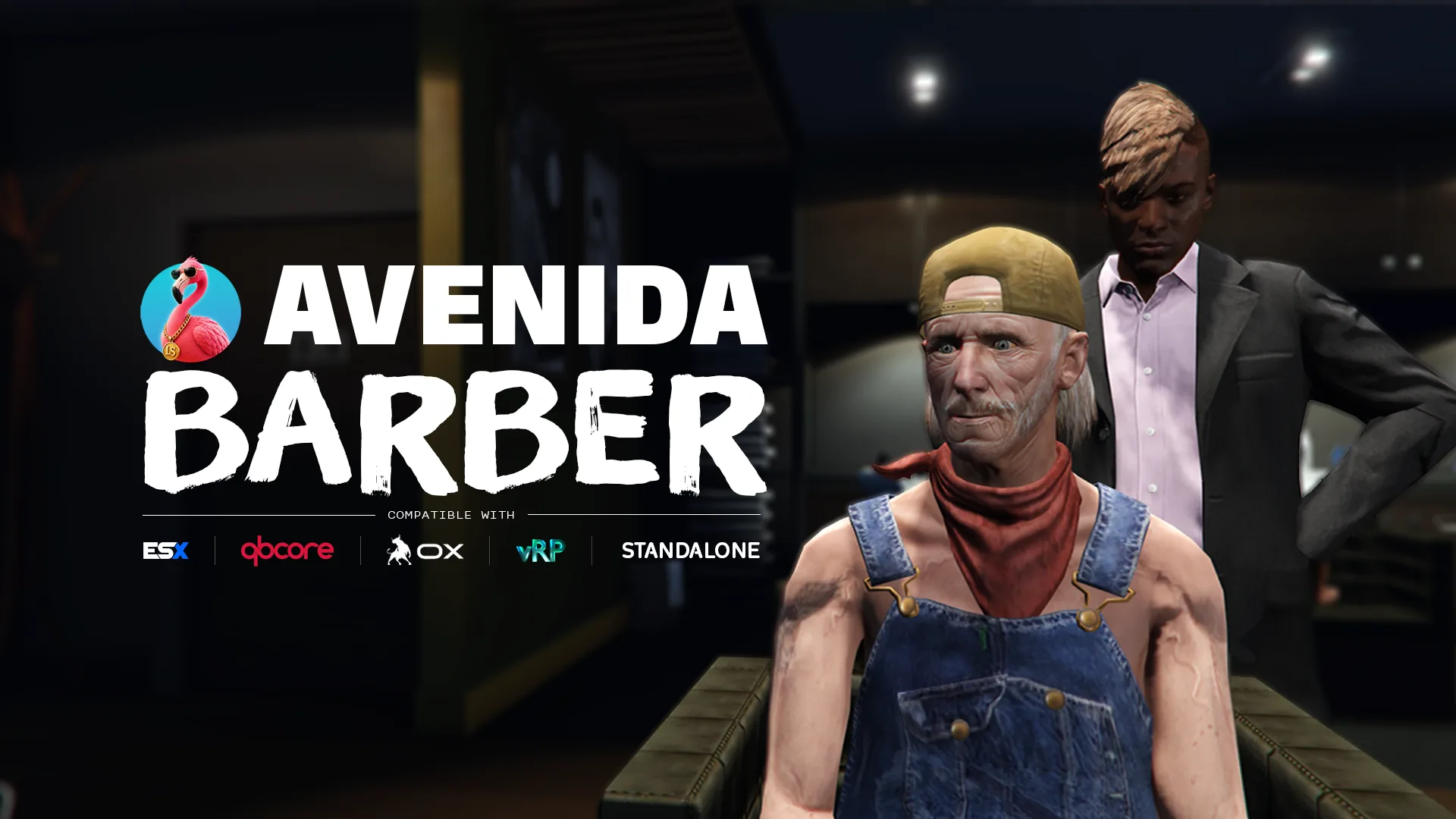
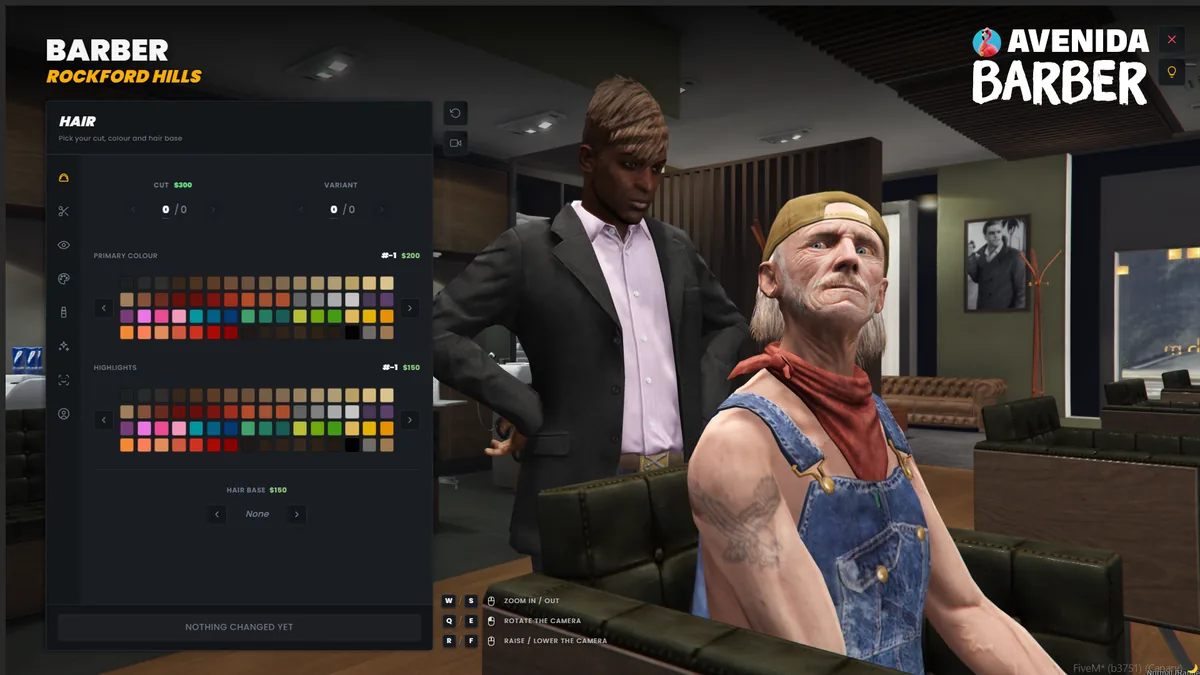
A moment your players talk about, instead of a menu they put up with. The character walks into the shop, sits down, the barber gets to work, and a free camera orbits their head while they choose. They see the cut under constant lighting, at midnight or at noon, and they do not pay until after.
| What you install | What it changes on your server |
|---|---|
| Orbit camera and 7 framings | The player judges the cut up close, so no more tickets saying it was not what they picked |
| Chair scene with a barber | A shop becomes a roleplay location instead of an interaction point |
| 8 preconfigured shops, including Cayo Perico | You cover the map the day you install, without placing a single blip |
| Price per component | You decide what is free and what you charge for, without touching the code |
| 15 in-game languages, already translated | Your players read the interface in their own language from the first launch |
| Config, locales and bridges outside escrow | You adapt the script to your server instead of the other way round |
What does a FiveM barber script actually have to do?
Six things, and only two of them appear on the store pages. A FiveM hair script has to write to the right appearance system, keep the character intact across a reconnect, show the result before payment, validate the price server side, live alongside the other resources that touch the ped, and hook into the framework you already run without making you rewrite its config.
| Criterion | What this script spares you |
|---|---|
| Writing to the right appearance system | A cut that applies and then vanishes on reconnect |
| Showing before billing | A player who pays, dislikes it, and opens a ticket |
| Validating the price server side | A modified client giving itself free haircuts |
| Sharing the ped decoration slot | Tattoos wiping the hair, or the other way round |
| Detecting the framework on startup | A resource that refuses to start on your server |
| Doing nothing when nobody is around | A thread running for no reason on every connected client |
How does a player change their haircut on FiveM?
They walk into a barber shop and open the barber menu, assuming the server has one installed. GTA V gives you nothing for this in modded multiplayer: without a dedicated script, a player keeps the cut chosen at character creation and can never change it. That is why every roleplay server installs one, and it is the question your players will ask on day one.
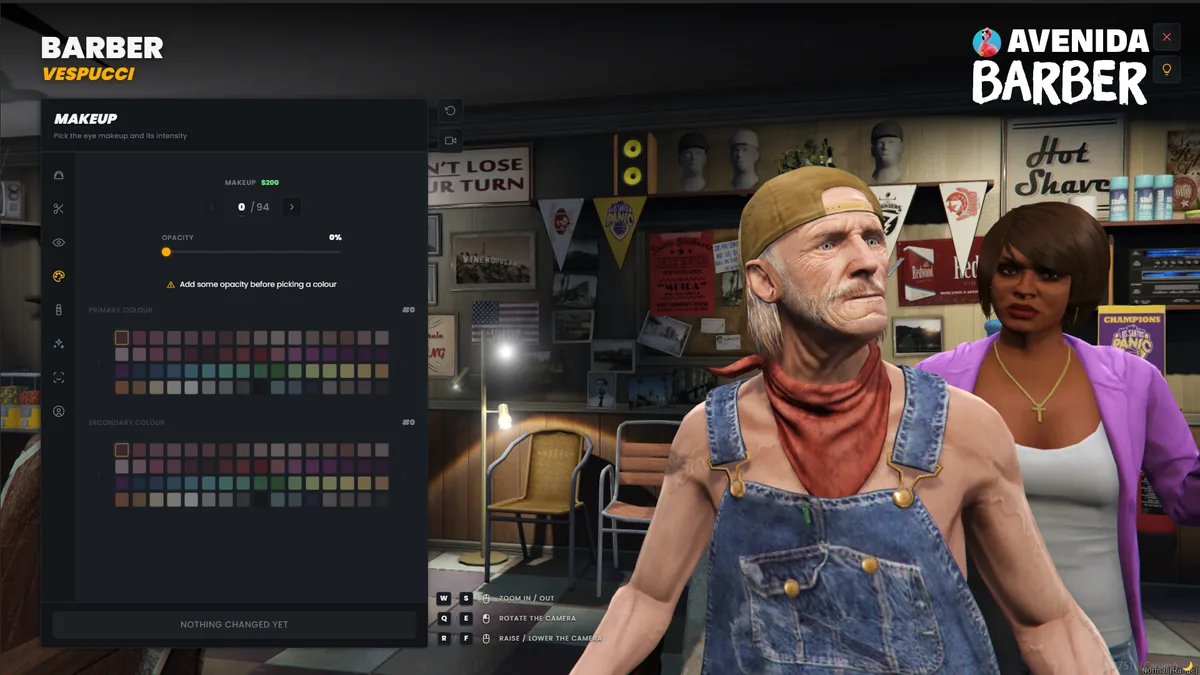
In practice, with a shop placed on the map, the player walks up to the point marked by a blip, confirms, and a menu opens. Inside are hair, beard, eyebrows, colour, makeup, and depending on the script, skin details. They confirm, they pay if there is a price, and their character keeps the cut across a reconnect, assuming the server hooked the script into the right appearance system.
If you are a player rather than a server owner, there is nothing you can install yourself; it all happens server side. If your server has no barber, or if the cut resets on every reconnect, its staff team is who to tell. This article is written for them, and it should give them something to act on.
Does the player see what they are buying before paying?
Rarely, and it is the number one cause of support tickets. Most FiveM barbershop scripts open a menu and apply the cut to a standing character, filmed by the game camera, at whatever time of day it happens to be in game. If it is the middle of the night on your server, the player picks a hair colour they cannot see.
That is the first point we set out to fix. Our camera is anchored to the head bone and captured once when the session opens, so no synchronised animation can drag the framing while the player is picking. It orbits a full 360, zooms, and travels from eye level down to the shoes, with the mouse or the keyboard. Sensitivity on all three axes lives in Config.Camera.
Seven framing presets, each with its own zoom and height bounds: face, head, bust, torso, legs, shoes, full body. Picking eyebrows puts the camera on the face, close enough to actually judge them. The player stays in control; the preset only decides where the session starts.
And while a menu is open, the character follows the cursor with their eyes. The pointer is projected onto a focal plane in front of the head and TaskLookAtCoord smooths between ticks. The projection is camera relative, so the gaze stays accurate at any angle. It costs one tick every 100 ms, tied to the camera session, and it is what finally lets you judge where a cut sits.
A timecycle modifier runs while a menu is open. A haircut looks the same at midnight as it does at noon, instead of a flat dark grey. The player’s own modifier is restored on close. Set Timecycle = false to leave world lighting alone, and Config.Barber.ChairScene = false to skip the chair scene.
What interface should a FiveM hair script have?
A modern web interface, served by the resource itself, downloading nothing from the internet. It is the clearest line between recent barber scripts and older ones. Many still run on RageUI, a native list menu, easy to write but dating from 2018 and showing you a few lines at a time.
Ours is written in Svelte 5. Fonts are hosted with the resource, there is no CDN and no external request, so nothing goes from your players’ clients to a third party. A first-run tutorial walks the player through it once, with a replay button, and it remembers per menu rather than once for the whole script.
The colour pickers read the game’s real palettes instead of approximating them, so what the player picks is what the character wears. And hair bases are gated by game build: a style the player’s client cannot render never appears in the list, rather than appearing and leaving them bald.
What do you gain depending on your appearance system?
The whole customisation catalogue, and on vRP you get more than the framework can do on its own. A barber script writes to the appearance resource you already run, so what that resource can store decides what survives a reconnect. Internally everything is in the qb-clothing shape and convert on the way out, target by target.
| Your system | What you gain |
|---|---|
qb-clothing, or its own table | The entire catalogue. This is the script’s native shape. |
illenium-appearance, fivem-appearance | Hair, beard, eyebrows, makeup, skin details and scars, all written to them. Two-tone overlays take their primary colour, since their schema stores only one. |
esx_skin | Every overlay and every component. To keep the watch and bracelet too, the script stores them in its own table, a one-line config option. |
vRP | More than vRP can do alone. vRP only stores clothing, so the script takes on the whole character in avenida_skins and hands vRP back its clothing half, re-read every 30 seconds. |
vRP stores clothing components and props, and nothing else: no head overlays, no face features, no hair or eye colour, no ped decorations. In other words, a vRP server cannot run a full barber on its own tools alone. So the script fills the gap: it holds the whole character in its table and hands vRP back its clothing half, re-read every 30 seconds and refreshed as soon as a change happens. Worth knowing before you configure: a native vRP skinshop will show the clothing, and the barber side stays with the script.
ESX, QBCore, vRP, standalone: what actually changes?
Nothing for you, and that is the point. The framework is detected on startup, through open bridge files you can read and edit. There are eight of them: framework, clothing, decorations, inventory, notif, interact, compat and vrp.
One point is worth spelling out, because it explains why so many scripts refuse to start on your server. We do not load @vrp/lib/utils.lua, we speak to vRP over its own Proxy and Tunnel events. Two consequences: the resource starts normally on a server with no vRP at all, and the differences in argument conventions between forks disappear, since they live in their helper and not on the wire.
What that does not cover, and we say so in the console rather than failing quietly: vRP 2 and vRP 0.5 are not supported. vRP 2 is a different framework that kept the name, and 0.5’s proxy has no reply channel. The target is 1.0 and the forks built on it, vrpex, dunko, zabka, MM1212 and ZIRIX.
Should you trust the 0.00 ms everyone advertises?
No, because everyone is measuring the same thing: idle. A barber script at idle does nothing by design, so showing 0.00 ms in resmon when nobody is in a shop tells you nothing at all. We advertise it too, and for the same reason.
What is worth a look is how that idle is achieved. On ours, the interaction points share a single thread that parks at one second when nobody is nearby, blips are created once, and every session thread is killed on exit. The gaze-tracking tick, at 100 ms, only exists while a menu is open.
We do not have a resmon figure under load that we are willing to publish, with thirty players connected and several barber sessions open at once. We would rather write that than reuse the idle figure and let it stand for both. If you take that measurement on your server, we want to hear about it.
What is new for FiveM barber shops in 2026?
Three things have changed since the previous generation of barber scripts, and all three are visible on screen. Web interfaces have replaced native menus, live preview has replaced applying the cut blind, and automatic framework detection has replaced writing the config yourself.
What is still unsolved in 2026 is compatibility between resource families. A server runs an appearance system, an inventory, a targeting system, and each has its own conventions. That is why the question to ask about a new FiveM barbershop script is no longer whether it looks good but where it writes.
Our latest published version is 1.2.0. This page tracks the versions: when the resource changes, the date at the bottom of the article moves, and the history says what changed. If you are reading this in six months, look there.
Our own observations, on three points the store pages skip
A ped has a single decoration slot, shared by the whole server
This is by far the most common cause of “my tattoos are gone” and “my haircut reset”. Hair bases and tattoos live in the same slot, and clearing it clears it for every other resource. A resource that wipes it carelessly wipes out every other resource’s work.
That is why avenida_barber, avenida_tattoo and avenida_clotheshops each put back what the others own on every redraw. The three run side by side instead of trampling each other. If you mix scripts from different families, that is the first thing to check.
The price is validated server side, never on the client
The total is built item by item, each one can be removed, and payment is validated on the server. Anything with no price is applied and saved without being billed or even shown in the cart. That is what lets you leave the cut free and charge only for overlays, or the other way round, without touching the code.
Hair bases are gated by game build
A style the player’s client cannot render is not listed, rather than listed and broken. It is one line of code and it removes an entire category of tickets, the “I bought a haircut and I’m bald” kind.
The checklist before buying a barber script
- Does the script write to the appearance system I already run? It must name its target, not say “compatible”.
- Is the list of what is kept per target published? If it is not published, the limits still exist.
- Does the player see the result before payment goes through? Yes, and under constant lighting.
- Is the price validated on the server? Yes, otherwise a modified client helps itself.
- Is the ped decoration slot shared properly? Yes, otherwise tattoos will get wiped.
- Are the config, locale and bridge files outside escrow? Yes, otherwise you cannot adapt anything.
- Is the framework detected, or do you set it by hand? Detected, with a dependency-free fallback.
Frequently asked questions
Does the script work without ESX or QBCore?
Yes. Standalone is the default fallback when no framework is detected, and it does not depend on any other resource. There is also a custom mode you pick explicitly, where you plug your own logic into the bridge files.
Can I edit the text and prices after buying?
Yes. config/*.lua, locales/*.lua, bridges/*.lua, the README, the CHANGELOG and the SQL file are outside escrow. You can open them and change them. The rest of the code is protected by Cfx escrow.
How many in-game languages ship with it?
Fifteen, fully translated and editable: English, French, German, Spanish, Italian, Brazilian Portuguese, Russian, Polish, Czech, Romanian, Turkish, Dutch, Arabic, Thai and Indonesian. These are the languages your players see, do not confuse them with the six languages this site is published in.
How many shops are preconfigured?
Eight, including Cayo Perico, each with a blip, a barber ped model and its own prices, in an open config file. You add or remove them without touching protected code.
Does the interface load anything from the internet?
No. The interface is Svelte 5, the fonts are hosted with the resource, there is no CDN and no external request. Nothing goes from your players’ clients to a third party. The documentation covers installation and exports.
Other barber scripts on the market
For context, here are a few names you will run into while searching. The list is nowhere near complete, and we are not linking to any of them. You will find each one under its own name.
vms_barber · DeeP-Scripts BarberShops · Barber Shop System V5 · EnhancedBarbershop · Player Run Barbershop · foltone_barbershop
What separates them from ours is not quality, it is the angle. Most are built around the barber job you run on your server. We built for the moment a player sets up their character and sees exactly what they get. If what your server needs first is a job with staff and a till, several of these scripts are cut out for that, and we are not going to claim otherwise.
Sources
Everything this article states about avenida_barber comes from files you can read yourself, before you buy and after:
- the resource
README.md, including its compatibility table per appearance system and its performance section; - its
CHANGELOG.md, including the known limitations list quoted above; - its
config/*.lua, for the eight shops, the per-component prices and the camera settings; - its
fxmanifest.lua, for theescrow_ignoreand the fifteen locale files.
Those four files are outside escrow, so you can read and edit them once the resource is installed. The screenshots on this page were taken on 24 August 2026, on version 1.2.0.
Update history
- 24 August 2026 · first published, on
avenida_barber1.2.0.
Got a question about a specific setup, an unusual appearance system or a vRP fork we have not listed? Discord is the place, and the developer who wrote the script is the one who answers.